LinkUnbound
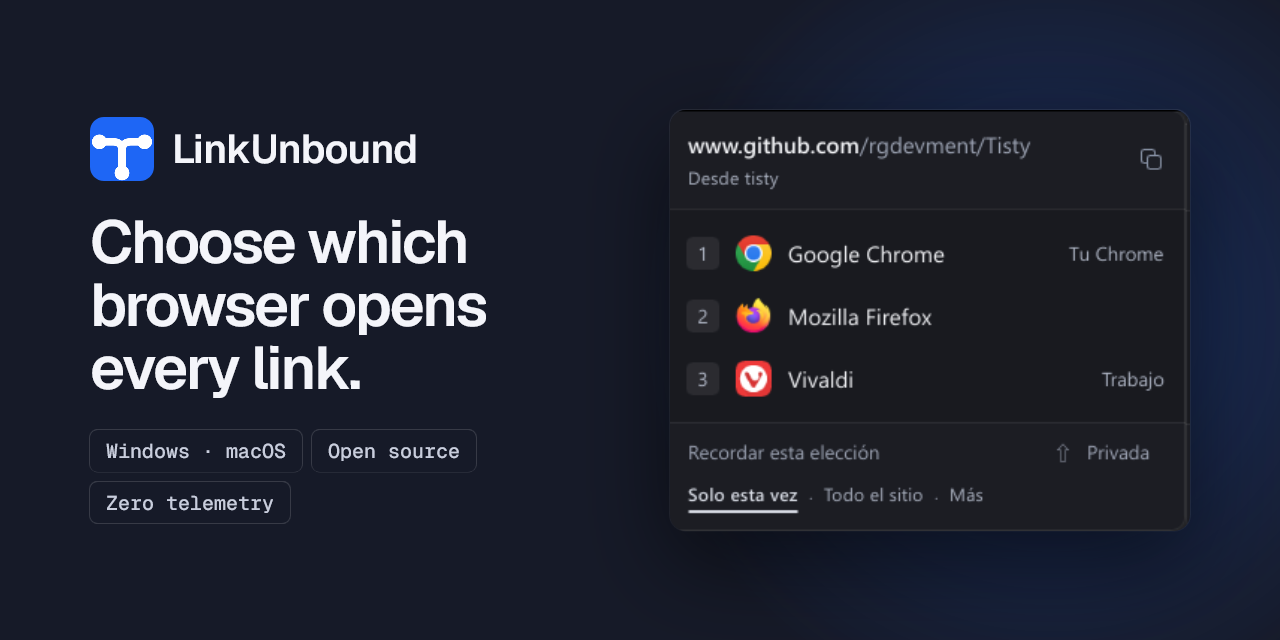
Choose which browser opens every link.
A link from Teams opens in Edge. One from Slack lands wherever Windows decided last. You keep three browsers and four profiles, and nobody asks you which one you meant.
WindowsmacOS GPL-3.0-only Free and open source
What it does
- It makes itself the default browser, so every link clicked outside a browser passes through it first.
- If a rule covers the link it opens straight away. If not, a small picker appears beside the cursor and you choose, with the mouse or the keys 1 to 9.
- A rule can match the site, a particular browser profile, or the application the link came from, so everything Teams opens can go to one browser while the rest goes to another.
- Microsoft SafeLinks are unwrapped before any rule is matched, so a rule sees the real address instead of the redirect.
How to install it
- Windows
- Microsoft Store
- macOS
-
brew tap rgdevment/tap && brew install --cask linkunbound - Direct download
- GitHub Releases
Privacy
No account, no ads, no telemetry, no server. Your rules and the links you open never leave the machine.
Questions
Why do Teams and Outlook still open Edge?
Both carry a setting of their own that hands links to your default browser, and that is the first thing to change: in Teams under Settings, Files and links; in classic Outlook under File, Options, Advanced. After that their links reach LinkUnbound like anybody else's. What is left is a channel of Microsoft's own that hands some links straight to Edge, which Windows 11 does not let another application stand in the middle of.
Does it work with browser profiles?
Yes. Installed browsers and their Chromium profiles are detected on their own, and a rule can send a link to one profile rather than just to the browser.
What does it cost?
Nothing, and there is no paid tier. It is released under the GPL-3.0, so you can read it, change it and share it.
Guides
- Open Teams links in a different browser (Windows and macOS) Microsoft Teams sends every link to Edge. Change the setting Teams already carries, and then decide what to do about the links that ignore it.
- Open Outlook links in Chrome or Firefox instead of Edge Classic Outlook has a setting that decides where a link in an email opens. Change it first, and then deal with what it leaves out.
- Send work links to a specific Chrome profile Chrome opens links in whichever profile was last used. Here is why that happens and how to route a link to the profile you meant.
- A Browserosaurus alternative that is still maintained Browserosaurus is no longer maintained and its own readme points elsewhere. What the alternatives are, on macOS and on Windows.